Guide ·
How to Track a Solana Wallet: SOL, Tokens and Transfers
Look up a Solana wallet, inspect SOL and SPL token holdings, follow transfers, and track activity with a worked example on Arkham.
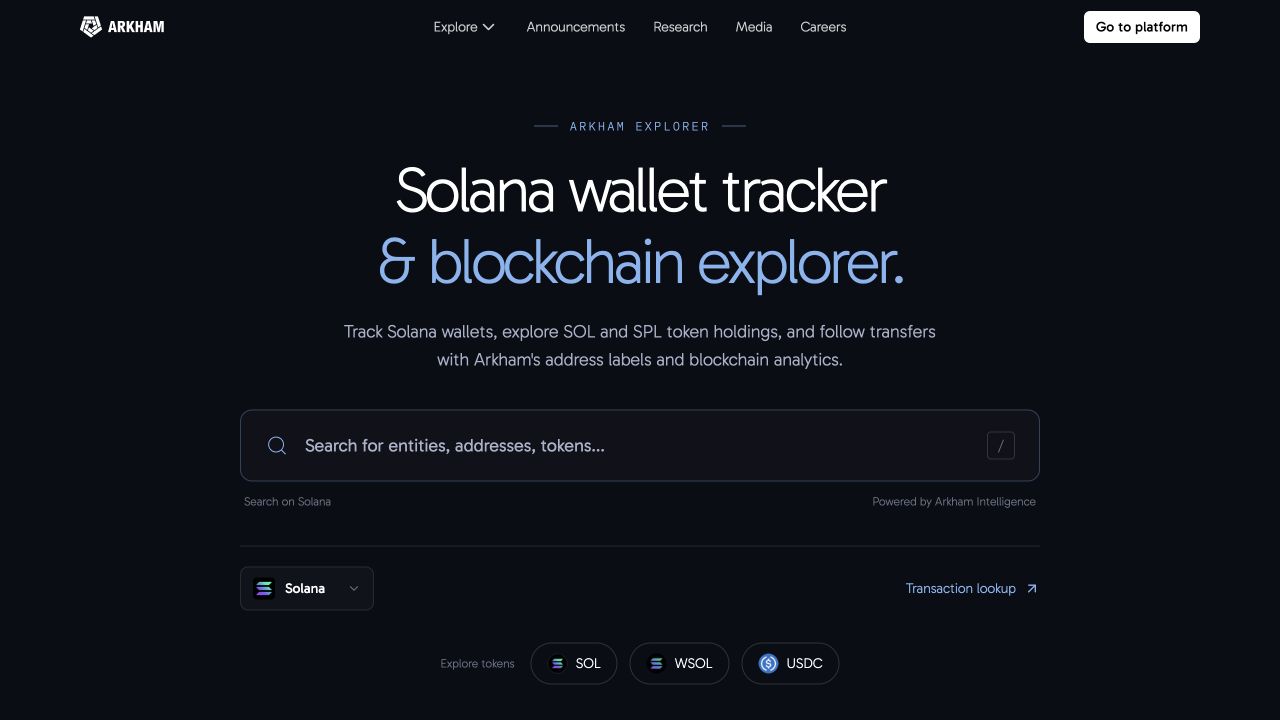
To track a Solana wallet, paste its public address into Arkham’s Solana explorer. Open the address to inspect its SOL and token holdings, review transfers, and see available labels for the wallet and its counterparties. You do not need to connect the wallet you are researching.
If you only have a transaction signature, start with transaction lookup, then open an address involved in the transaction.
1. Find and look up the wallet address
Start with the full public address, copied from your wallet app, a transaction record, or a source you can verify. An address identifies an account; a token ticker or a person’s display name is not a substitute for it.
Open the Solana wallet tracker.
Paste the address into the search bar and open the matching address result.
Check the full address before interpreting the balances or transfers.
If you search by an entity name instead, check whether you have opened an entity page or an individual address. An entity can group multiple addresses, so its portfolio may differ from any one wallet.
2. Read SOL and SPL token holdings
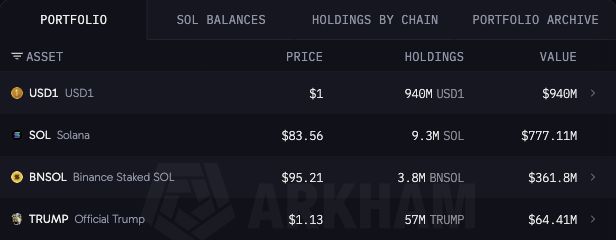
The Portfolio table shows the assets Arkham tracks for the address. Read the token quantity in Holdings separately from its estimated USD Value: a portfolio’s dollar value can change when token prices move, even when the wallet makes no transfers.
SOL is Solana’s native asset. SPL tokens include assets such as USDC and wrapped SOL. A token’s mint address identifies it; names and tickers alone can be copied. Solana uses token accounts to hold a particular token for an owner, so a token account, a token mint, and the wallet owner’s address are different things. Solana’s token documentation explains these relationships.
Where a portfolio row offers Show accounts, use it to inspect the accounts behind that token balance. Liquid staking tokens such as BNSOL are separate assets from native SOL; read the token name before treating a balance as spendable SOL.
Worked example: inspect a Binance Solana cold wallet
Open this Binance-labeled Solana cold wallet:
9WzDXwBbmkg8ZTbNMqUxvQRAyrZzDsGYdLVL9zYtAWWM
Confirm that the address ends in AWWM and that the page identifies it as Binance: Cold Wallet.
In Portfolio, find the SOL row. Compare its token quantity with its USD value.
Compare SOL with a separate asset row, such as BNSOL or USD1. These are different holdings, not additional units of native SOL.
Open Transfers and inspect an incoming or outgoing transfer. Check its token, amount, time, and counterparty.
Open the Binance entity link to compare the individual address with the broader entity. Keep the network filter on Solana when making a chain-specific comparison.
The screenshot shows part of this wallet’s portfolio at capture time. Balances, prices, labels, and row order can change. Exchange custody can include customer assets, so this wallet’s balance should not be read as Binance’s own corporate treasury.
3. Follow transfers and identify counterparties
Use Transfers to review activity involving the address. Inflow and Outflow help separate incoming and outgoing movements. Narrow the results by token, time, or value when you are investigating a particular event; check active filters before concluding that a transfer is missing.
Open a transfer to examine the transaction details. A Solana transaction can contain several instructions, so one transaction can involve more than one asset movement. Read the full transaction rather than assuming every row represents a separate trade. See Solana’s transaction documentation for the underlying structure.
Click a counterparty address or available entity label to continue the investigation. A transfer to an exchange does not, by itself, prove a sale: it could be a deposit, an internal movement, or another operation. Use the surrounding activity to establish what happened.
On Solana transfer tables, the Show Solana owner account control can help distinguish token-account addresses from their owners. Check which view is selected when comparing results with another explorer.
4. Track future activity
Use Create Alert on the address page to configure notifications for activity you want to follow. Choose the direction, token, and value conditions relevant to your investigation, then review the alert settings before saving. Account access may be required.
For a broader view, Top Counterparties helps identify recurring interactions. Visualize opens a graph for exploring relationships between addresses. These tools complement the transaction record; they do not establish ownership or trading intent on their own.
Common questions
Can I track a wallet without connecting it?
Yes. A public address is enough to look up on-chain activity. You do not need its private key or recovery phrase. Account features such as alerts may require signing in.
Can I find out who owns every Solana wallet?
No. Arkham can show available labels and entity associations, but some addresses remain unidentified. Distinguish a known label from a prediction, and avoid treating a transfer between two addresses as proof of common ownership.
Why does the portfolio differ from my wallet app?
Compare the same address, network, tokens, and observation time. Differences can come from prices, data refresh timing, token-account handling, or the treatment of staked assets and DeFi positions. A displayed token portfolio should not automatically be treated as a complete account of every position.
How do I find large Solana wallets?
The Solana explorer lists top SOL holders by address and known entity. For a particular asset, use the SOL token page or USDC on Solana. Address rankings and entity rankings answer different questions, and large exchange or protocol balances can represent many users.
Ready to inspect an address? Open the Solana explorer and start with the wallet’s public address.

Arkham
The Arkham Research Team comprises analysts and engineers who worked at Tesla, Meta, and Apple, alongside alumni from the University of Cambridge, Imperial College London, UC Berkeley, and other institutions.
More from Arkham